A visual comparison of four popular website builders—Squarespace, Shopify, Wix, and WordPress—to help businesses explore their options and choose the right platform for their needs.
Squarespace, Shopify, Wix, or WordPress? If you're building a new website or considering a redesign, choosing the right platform can feel overwhelming.
Each website builder promises an easy way to create a professional online presence. But while many offer similar design tools and templates, they're not all built for the same types of businesses.
Some are better suited for service-based businesses, while others are designed for ecommerce. Some offer greater flexibility but require more technical expertise, which can create additional costs over time.
After more than 11 years working in ecommerce and digital strategy, and firsthand experience with Squarespace, Shopify, Wix, and WordPress, I've learned that the best website builder isn't necessarily the most popular or the most advanced. It's the one that makes the most sense for your business.
Here's how the platforms compare, what I've learned from working with them, and what I recommend small business owners consider before making a decision.
What Is a Website Builder?
A website builder is a platform that allows you to create, customize, and manage a website without necessarily needing to write code.
Many modern website builders use a visual editing experience, often called WYSIWYG (What You See Is What You Get). Instead of building each page through code, you can customize layouts, add images, adjust fonts, and organize content through a visual interface.
For business owners without technical backgrounds, this makes building and maintaining a website considerably more approachable.
However, not all website builders provide the same level of flexibility, functionality, or control.
That's where understanding the differences becomes important.
Squarespace vs. Shopify vs. Wix vs. WordPress: What's the Difference?
Squarespace: Best for Service-Based and Content-Focused Businesses
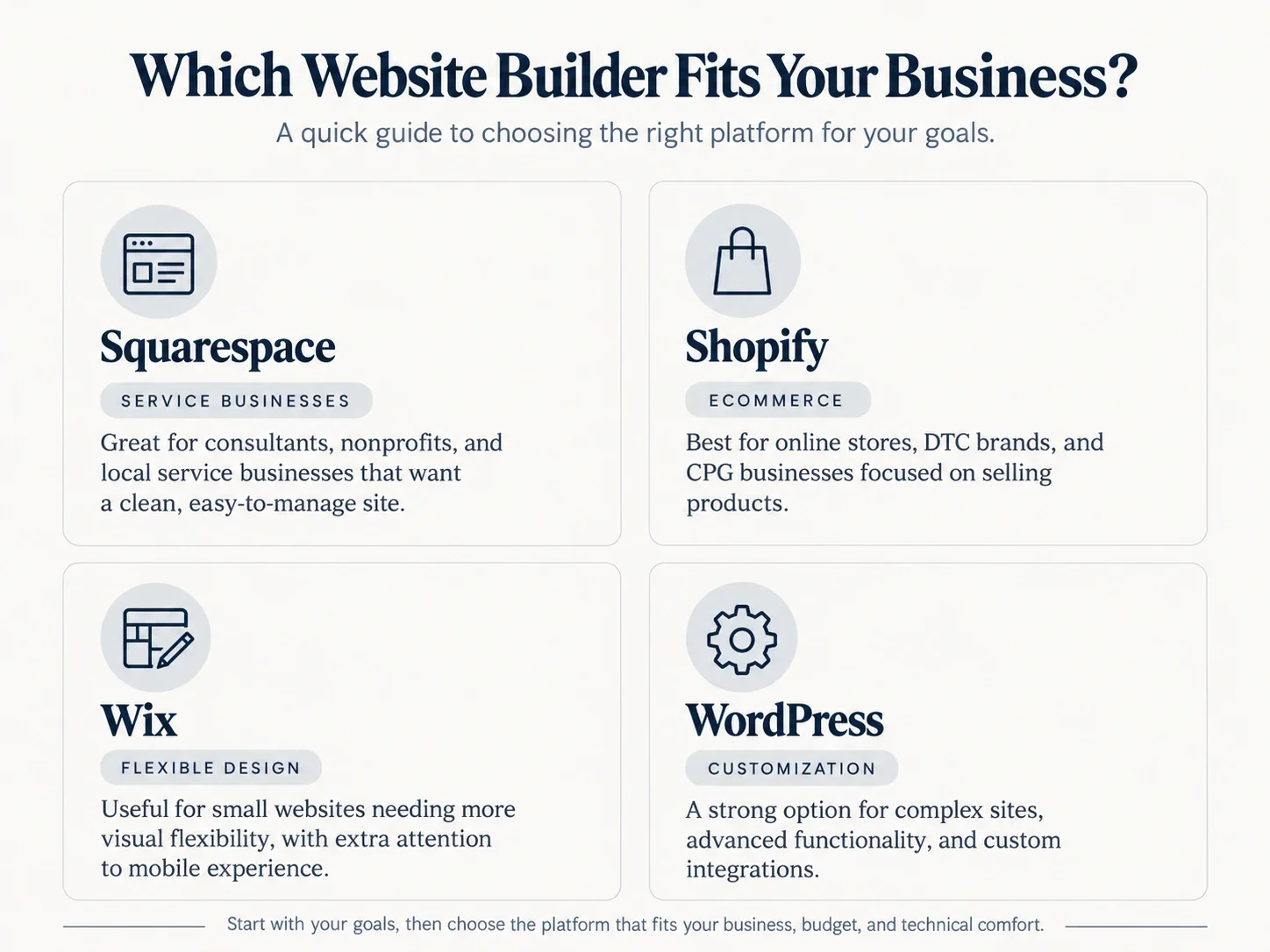
A quick comparison of Squarespace, Shopify, Wix, and WordPress to help businesses choose the right website builder for their goals and needs.
Squarespace is one of my top recommendations for small businesses that want a professional, easy-to-manage website without significant technical involvement.
Its visual editor makes it relatively straightforward to customize layouts, fonts, colors, and content while maintaining a cohesive design.
I particularly recommend Squarespace for:
Professional service providers
Consultants and small agencies
Wellness and fitness businesses
Nonprofits and community organizations
Businesses focused primarily on sharing information, showcasing services, and generating inquiries
Squarespace also includes foundational SEO features such as customizable page titles and descriptions, automatically generated sitemaps, and certain types of structured data.
My perspective: One of Squarespace's biggest advantages is the independence it gives business owners. You don't need to rely on a developer every time you want to update a service description, publish a blog, or change an image.
There are limitations to how much you can customize certain features and integrations, but for many small and growing businesses, the simplicity is a benefit rather than a drawback.
Shopify: Best for Ecommerce and Consumer Product Brands
If your primary goal is selling products online, Shopify would typically be my first recommendation.
Unlike general-purpose website builders, Shopify was built around ecommerce.
It brings together product management, checkout functionality, payment processing, inventory tools, and online merchandising in one platform.
I particularly recommend Shopify for:
Direct-to-consumer (DTC) brands
Consumer packaged goods (CPG) businesses
Retailers selling physical products
Growing ecommerce businesses
Brands that need scalable product and inventory management
Shopify also provides a visual theme editor, making it easier for nontechnical users to manage their online storefront.
From an SEO perspective, Shopify includes essential features such as editable metadata, automatic sitemaps, and mobile-responsive themes.
My perspective: Shopify makes the most sense when ecommerce is central to your business model. Its advantage isn't simply that you can sell products. It's that the platform is designed to support the entire shopping experience.
However, additional applications, premium themes, and advanced functionality can increase costs. It's worth determining what your business actually needs before committing to add-ons.
Wix: Flexible Design, but Pay Attention to Mobile

Mobile-friendly e-commerce page designed to create a seamless customer experience.
Wix is another well-known website builder that allows businesses to create and customize websites without extensive coding knowledge.
It offers visual editing tools and considerable design flexibility, making it appealing to business owners who want control over how their website looks.
However, one limitation I've encountered is the additional attention sometimes required to get the mobile experience right.
Wix does offer mobile-friendly layouts and responsive design tools, and its newer editing experiences have improved how designs adapt across devices. Still, depending on the editor and layout, you may need to make additional adjustments to ensure everything works properly on a phone.
That matters because customers should be able to navigate your website, read your content, and take action just as easily on mobile as they can on a desktop computer.
My perspective: A website that looks great on a laptop but feels difficult to use on a phone isn't delivering a complete customer experience.
Wix can absolutely work for small businesses, but I would pay particular attention to its mobile usability before making a final decision.
WordPress: Best for Businesses That Need Greater Customization
WordPress is one of the most established website platforms, and it continues to offer significant flexibility.
It can accommodate everything from a relatively simple informational website to a highly customized digital experience.
WordPress also has visual editing capabilities, including its block editor and a range of page-building tools.
For businesses with specific technical requirements, custom functionality, or complex integrations, WordPress can be a strong option.
But here's where my perspective has evolved.
With more approachable website builders like Squarespace and Shopify available, I think businesses should carefully consider whether they actually need WordPress's additional flexibility.
Depending on how a WordPress website is built and hosted, ongoing updates, security, plugin compatibility, and technical maintenance can require additional time or professional support.
My perspective: WordPress is a powerful platform, but more flexibility doesn't automatically make it the better choice.
If a business primarily needs a clean, professional website that its team can easily manage, I would question whether the additional complexity is necessary.
That doesn't mean WordPress is outdated. It means its benefits should justify its maintenance requirements.
A Real-World Example: Why I Moved Two Nonprofits From WordPress to Squarespace
One of the most valuable lessons I've learned about website platforms came from working with two local nonprofit organizations.
Both organizations were operating websites built on WordPress.
While WordPress offered plenty of functionality, it also created a degree of dependency on technical expertise for managing their websites.
For organizations operating with limited resources, that dependency can become an unnecessary expense.
I migrated both websites to Squarespace with one important objective: put control of the website back into the hands of the organizations themselves.
The result wasn't simply a change in platform.
By moving to a more user-friendly editing environment, the organizations could manage more of their own website content and updates without consistently relying on technical professionals.
That increased their autonomy and reduced ongoing costs.
For me, this is one of the strongest examples of why choosing the right platform matters.
A website shouldn't become another operational burden. It should be a resource that the business or organization can confidently manage.
Another Example: Updating an Established Business Without Losing Its Identity

Before-and-after mobile website redesign for Simply Financials Plus, showcasing modern design, clearer messaging, and improved usability.
I also worked on a website redesign for a bookkeeping services business with more than 20 years of history.
When a business has been operating for decades, a redesign isn't about replacing everything that came before it.
It's about modernizing the experience while preserving the identity and credibility the business has already established.
Through the redesign, we were able to update fonts, colors, and the overall look and feel while maintaining continuity with the existing business.
This is an important consideration for established small businesses.
You don't necessarily need an entirely new brand to create a better website. You need a platform and a thoughtful design approach that allow your brand to evolve without losing what makes it recognizable.
Which Website Builder Is Best for SEO and AI Discoverability?
This is one of the most important questions I consider when evaluating website platforms today.
Having a professional-looking website is only part of the equation. Your website also needs to be discoverable when potential customers search for the products or services you provide.
That includes traditional search engines like Google and Bing, as well as increasingly relevant AI-powered search experiences.
What SEO Features Should You Look For?

Magnifying glass on a blue background signifying what SEO features a business should look for in a website builder.
At a minimum, I recommend evaluating whether a website platform supports:
Customizable SEO titles and descriptions: So you can clearly communicate what each page offers.
Clean, descriptive URLs: To help visitors and search engines understand your content.
Mobile-friendly design: So users can comfortably navigate the website across devices.
Structured data: To help search engines interpret information about your business, services, products, and content.
XML sitemaps: To help search engines discover important website pages.
Image optimization: Including descriptive alternative text and appropriately sized images.
Analytics integrations: So you can understand how visitors find and interact with your website.
Squarespace, Shopify, Wix, and WordPress all support many foundational SEO capabilities, although the setup, level of control, and need for additional tools differ.
What About AI Discoverability?
AI discoverability is becoming an increasingly important part of website strategy.
Businesses aren't just thinking about how to appear in traditional Google search results. They're also considering how their information can be understood and referenced by tools like ChatGPT, Perplexity, and Google's AI-powered search experiences.
When evaluating a platform, I look at whether it supports the technical foundations that can help make website content accessible and understandable, including structured data, crawlability, and organized content.
I also look at whether those capabilities are included or require additional paid tools or development support.
But there's an important distinction: no website builder can guarantee visibility in AI-generated answers.
The platform provides the foundation. Clear content, relevant information, credible expertise, and ongoing optimization are what make that foundation useful.
My advice is to evaluate SEO and AI discoverability capabilities before building your website, rather than treating them as an afterthought.
How Much Does a Website Builder Really Cost?
One of the biggest mistakes businesses can make is evaluating a website builder based solely on its advertised monthly price.
The true cost of a website includes more than the subscription.
Depending on the platform and your requirements, you may also need to account for:
Domain registration and hosting
Premium themes or templates
Paid applications and plugins
SEO and analytics tools
Ecommerce transaction or payment processing fees
Ongoing technical maintenance
Professional design or development support
Staff time spent managing website updates
For example, a platform that appears less expensive initially might become more costly if you consistently need outside assistance to make changes.
Conversely, a platform with a higher subscription cost could offer better long-term value if your team can manage the website independently.
That's why I always consider both the initial investment and the ongoing cost of ownership.
How to Choose the Right Website Builder for Your Small Business
Before comparing features, pricing plans, or templates, I recommend starting with something much simpler.
Identify the three most important goals you want your website to achieve.
Your goals might include:
Attracting more website traffic
Generating more inquiries or sales
Improving conversion rates
Increasing customer reviews
Building visibility in Google and AI search
Making the website easier to manage
Creating a better mobile experience
Once you've identified your priorities, you can evaluate which platform best supports those goals.
For example, if you're a local consulting business that wants to generate more qualified inquiries and regularly publish helpful content, Squarespace may be a practical choice.
If you're launching a skincare brand and plan to sell products directly to consumers, Shopify would likely be better suited to your needs.
If your business requires highly specialized functionality or extensive custom integrations, WordPress may be worth considering.
The key is to let your business requirements guide the platform decision, not the other way around.
Should You Build Your Own Website or Hire a Professional?

Choosing between DIY website building and hiring a professional based on budget, time, and technical expertise.
Modern website builders have made it easier than ever to create a website yourself.
But just because you can build your own website doesn't necessarily mean it's the best use of your time.
When helping businesses make this decision, I consider three factors.
1. Budget
How much can you realistically invest in your website?
If your budget is limited and your requirements are straightforward, a DIY website may be a reasonable place to start.
However, it's important to weigh the upfront savings against the time and resources needed to build and maintain the site yourself.
2. Technical Comfort
How comfortable are you learning a new platform, managing website settings, and troubleshooting issues?
You don't need to be a developer to use Squarespace or Shopify, but you should feel confident making routine updates and managing the website over time.
If technology isn't your strength, professional support may help you avoid unnecessary frustration.
3. Time
This is often the most overlooked factor.
Building a website involves more than selecting a template and uploading a few images.
You also need to think through the customer journey, page structure, content, navigation, mobile usability, SEO, and conversion opportunities.
If running your business already takes most of your time, working with a professional may be a more efficient investment.
The goal isn't necessarily to hand over every website decision to someone else. It's to get the right level of support so your website works for your business without becoming a second job.
My Recommendation: Choose the Platform That Works for You
After working with Squarespace, Shopify, Wix, and WordPress, my recommendations generally come down to the type of business and what the website needs to accomplish.
For most small service-based businesses, I recommend starting with Squarespace.
For ecommerce and consumer product brands, Shopify is typically my first choice.
Wix can be an option for businesses seeking design flexibility, although I would pay close attention to the mobile experience.
And for businesses with more complex technical requirements or specialized customization needs, WordPress may offer advantages worth the additional investment.
Ultimately, I don't believe businesses should choose a website builder simply because it's the one they've always heard of or used before.
The right platform should support your goals, fit your budget, and give you the flexibility to manage and grow your online presence.
Need Help Choosing the Right Website Platform?
Choosing a website builder is only one part of creating a successful website.
Understanding what your customers need, how they navigate your site, and what encourages them to take action is just as important.
At LD Strategy, I help small and growing businesses make sense of their digital opportunities, from selecting the right website platform and improving the user experience to strengthening SEO, AI discoverability, and conversions.
Whether you're starting from scratch, considering a redesign, or wondering if your current platform is still the right fit, I can help you identify what makes the most sense for your business.
Not sure where to begin? Get in touch with LD Strategy and let's talk through your goals.